


Most professionals posting on LinkedIn are flying blind. They hit publish, watch the notification bell for a day or two, then move on. The numbers are all there. Profile views. Post impressions. Search appearances. But without a way to interpret them, they're just trivia.
LinkedIn Analytics is more useful than most people give it credit for. It won't replace a full demand generation strategy, but it will tell you whether your presence is gaining traction with the right people and where the gaps are. That's the feedback loop that makes consistent effort worth something.
Here's how to read it.
Your LinkedIn Dashboard: What's Private, What's Useful
Your LinkedIn Analytics dashboard is visible only to you. No one visiting your profile can see it. You'll find it near the top of your profile page, and it tracks three things that matter. Profile views. Post impressions. Search appearances.
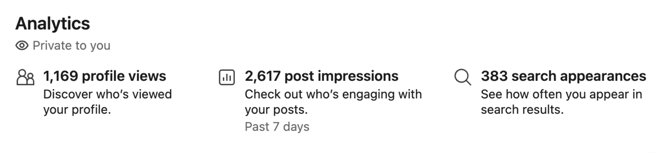 For reference, your dashboard should look something like this.
You might ask, WHY IS THIS DASHBOARD SO DUMB? Specifically, these numbers don’t mean anything if you don’t know the time period they are referring to. They only label the one in the middle, which is unexplainable to us!
So, to be helpful, when you look at these LinkedIn statistics, please note that Profile Views show how many people looked at your profile in the last 90 days. Post impressions show how many times your posts were shown on LinkedIn over the past 7 days (that one is labeled), while the search appearances show how often your profile came up in search results in a recent running 7-day chunk.
Each one measures a different piece of your visibility. Together they tell a coherent story about whether your LinkedIn presence is working strategically, not just socially. If you want another quick pulse check between deep dives, your LinkedIn SSI score is worth a look too. It's a different measure, but it asks the same underlying question. Are you building real influence or just making noise?
One note before diving in. LinkedIn's interface updates regularly, so the exact layout of your dashboard might look different from the screenshot above or from older guides you've seen. What doesn't change are the underlying signals. Focus on the data, not the UI.
With that out of the way, let’s dive in.
Profile Views: Are the Right People Finding You?
Profile views show how many members viewed your profile over the past 90 days. Click into that number, and you'll land on Who's viewed your profile. The screenshot below is the Premium version, with a 90-day trend line and filters for things like company and interesting viewers. LinkedIn Profile Visits show how many members viewed your profile over the past 90 days.
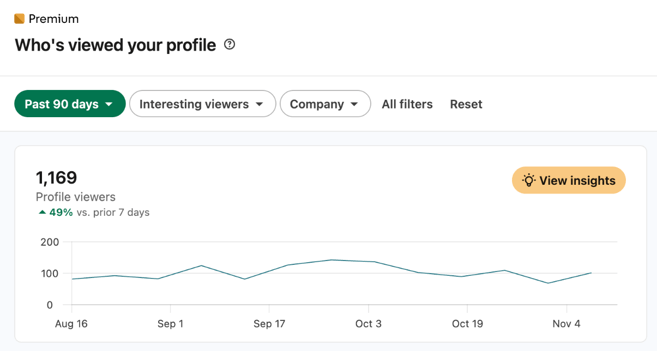
The number itself matters less than the trend. Next to the total, LinkedIn shows the percentage change versus the prior seven days, and the line chart shows how it has moved across the 90 days. If visits spike around a stretch of active posting, that can be a sign your content is prompting people to learn more about you. LinkedIn doesn't tie profile visits to specific posts, though, so treat the timing as a pattern worth watching rather than a confirmed cause. If views stay flat despite consistent posting, that's worth investigating. Your content may be reaching people without compelling them to take the next step.
LinkedIn Premium gives you a fuller picture, including a list of who viewed you, filters like company and interesting viewers, and trend data over time. It's useful if you have it, but not required. The free dashboard still tells you whether your activity is creating visibility.
What to watch for is a sustained pattern of visits from relevant industries and titles. That's a stronger signal than raw volume. Ten visits from potential clients matter more than a hundred from people outside your market.
Post Impressions: Who's Actually Paying Attention?
Post impressions are the number you see on your dashboard. This counts that elusive magic of how many times your posts were shown on LinkedIn. That tells you how often your content appeared, but not who was looking.
What they don’t show you here are the actual post views, which can only be seen in your feed. LinkedIn Post Views are where the strategic insight lives, and most people underuse them. It takes more time, but it is worth the trouble. To see the breakdown for any post, open it and click the impressions count below it. You'll get a window showing the top companies, job titles, and geographic locations of people who viewed that post.
Treat this data as a signal, not a scoreboard.
-
Top Companies. If the same company shows up again and again across multiple posts, someone there is paying attention. Treat that as a warm signal worth noting, not confirmation that the account has already moved into a consideration phase. Keep showing up for them, and let other signals, like a direct inquiry or a connection request, tell you when real interest is building.
-
Top Job Titles. This is your audience calibration check. If the titles match the people you're trying to reach, your content is doing its job. If you're writing for marketing decision-makers but consistently reaching coordinators, that's telling you something about how you're framing your content, not just who's sharing it.
-
Top Locations. Geography matters more for some businesses than others, but it's worth a look. If you're concentrated in markets you don't serve or missing markets where you have active prospects, factor that into your content and engagement strategy.
The pattern across several posts tells you more than any single one does. That kind of consistency is the backbone of a real thought leadership strategy, and it only shows up once you've got enough data to read.
🔥 Hot tip: Cut and paste the last 30 days of data you see into AI and ask it to give you an evaluation of what is performing well and suggestions about what you might do to accentuate the positive!
Search Appearances: How Discoverable Are You?
Search appearances is a weekly count of how many times your profile showed up in LinkedIn searches. This metric largely comes down to your profile, specifically your headline and About section.
If your About section is written with your target audience in mind, using the language they use to describe their own problems and the roles they're trying to fill, you'll tend to surface in more relevant searches. If it reads like a resume summary, you're less likely to surface as often.
Scroll past the weekly number to find data on the titles and companies your searchers work for. This tells you whether your profile is attracting the people you're trying to reach or whether there's a mismatch worth fixing. Getting the fundamentals right here is a big part of building a strong personal brand on LinkedIn.
If you're not showing up at all, that often points to a profile optimization issue. If you're showing up but to the wrong audience, that often points to a positioning issue. Either way, the data gives you a place to start looking.
What the Numbers Mean Together
Each of these analytics measures something different, but they're most useful read as a set.
Profile visits tell you whether your content is generating enough interest for people to want to know more about you. Post view breakdowns tell you whether the right people are seeing your content and whether it's resonating with your target audience. Search appearances tell you whether your profile itself is doing the work of attracting relevant attention, even when you're not actively posting.
When all three are trending in the right direction, you're building the kind of visibility that can lead to real conversations. When one is lagging, you have a clear place to focus.
This is also where consistency stops being optional. These analytics only tell a meaningful story once there's enough activity behind them to create a pattern worth reading. A post here and there won't give you useful data. A steady content cadence will.
The Real Question
The number of impressions you got matters far less than whether your LinkedIn presence is actually helping you have real conversations with the right people. That's the question these numbers are built to answer. Read them regularly, inside a strategy that connects your content to your goals and your audience to your offers, and you stop guessing and start making decisions.
If you want to build that kind of intentional presence, our Social Influence course is where to start. It's built to give you the strategy, the structure, and the confidence to show up on LinkedIn in a way that can actually generate results.




Let Us Know What You Thought about this Post.
Put your Comment Below.